Introduction
In a recent project we considered introducing Apache Iceberg. The idea was to have many writers writing into a single Iceberg table, plus one or more readers. The table itself should live on an object storage solution like S3. Since we were talking about a single table and had no further use cases at that point, it didn’t feel intuitive to add extra infrastructure just to run a catalog.
I only had brief knowledge about Apache Iceberg at that point. To me it was an open table format: some metadata files pointing to some data files which hold the actual data on a cloud storage (i.e. AWS S3).
If the metadata file location is already known, if there is only a single table, and if Apache Iceberg is just a collection of metadata files - why would a new component like a catalog be needed?
Well … this article provides the answer.
This article & the answer
The Iceberg catalog provides two key features:
- It is always the first entry point when an engine reads or writes an Iceberg table, because it points to the latest metadata file representing the table.
- It provides an atomic operation for updating the version of a table, i.e. pointing to the new latest metadata file.
This answer (well … a more accurate and complex version of it) was given to me by an AI tool. But I wasn’t really able to understand it. This article tries to build up the knowledge needed to fully understand it. And that is quite interesting, because it explains Apache Iceberg itself!
The Iceberg Table Format
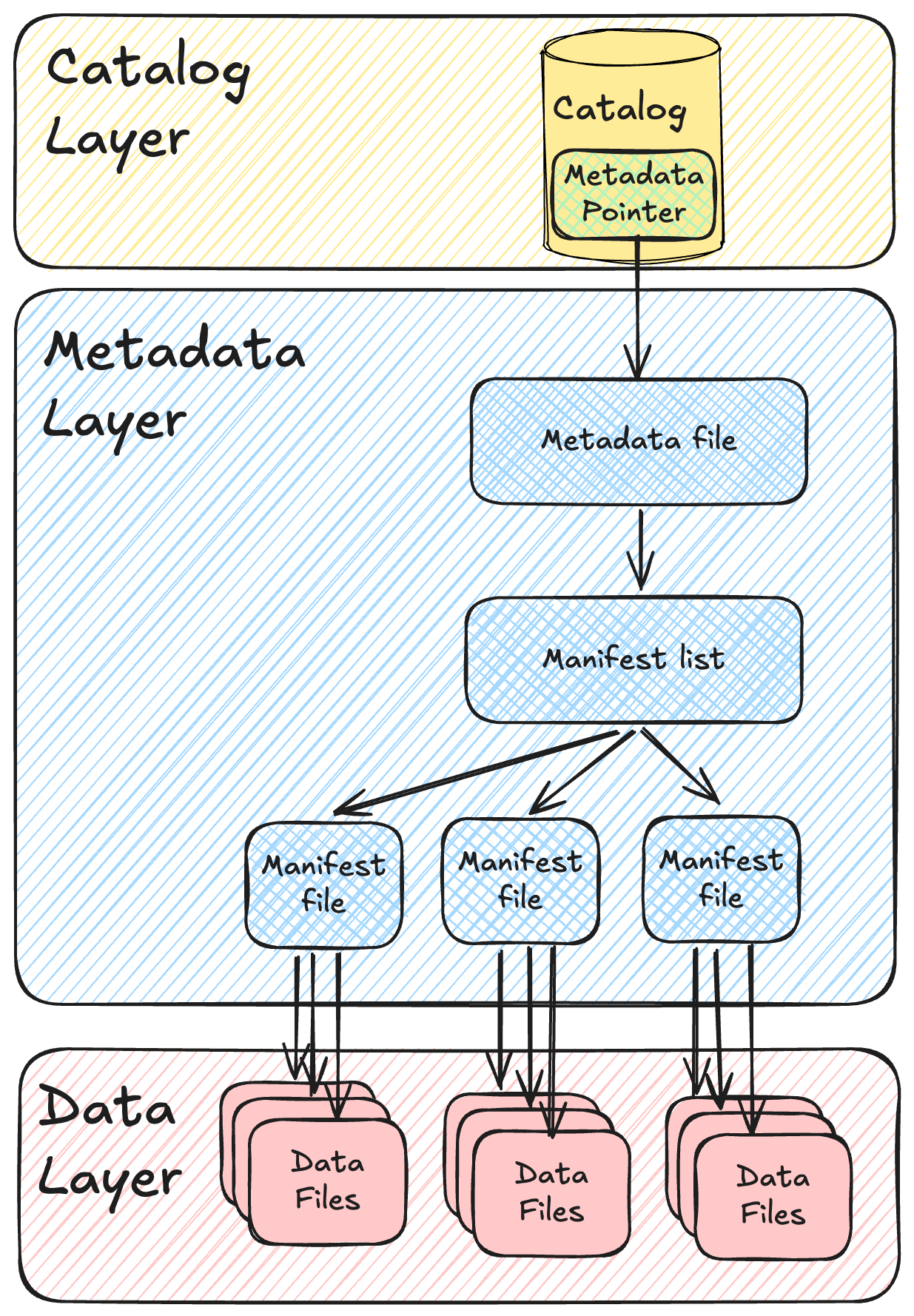
It’s easier to explain an Iceberg table bottom-up rather than top-down, so I’ll invert the order of the image for the explanation:
- Data layer: holds the data files which contain the data represented in the Iceberg table. The data layer can be a local disk, the Hadoop Distributed File System (HDFS) or cloud object storage (AWS S3, Azure Data Lake Storage (ADLS), Google Cloud Storage (GCS)).
- Data file: a table consists of one or many data files. Each data file holds either the full table data or a subset of it. Accepted formats for data files are Parquet (most commonly used), Avro and ORC.
- Metadata layer: holds different types of metadata files.
- Manifest file: a manifest file points to the locations of different data files (or delete files, more on those later). But it does even more than that: a manifest file also holds basic statistics about the data it points to, such as row counts or upper/lower bounds.
- Manifest list: each snapshot of a table has exactly one manifest list, so the manifest list can be seen as the file representation of a snapshot. It always contains the full list of manifest files that represent the table at a certain point in time. And just like a manifest file, it stores summary statistics (e.g. partition value ranges and file counts per manifest), which can later be used to speed up certain types of queries.
- Metadata file: the metadata file points to all available manifest lists, including their relation to each other (each snapshot points to its parent). The metadata file also holds information about partitioning and the table schema.
- Catalog: as mentioned in the introduction, the catalog has two very important tasks:
- It is always the first entry point when an engine reads or writes an Iceberg table, because it points to the latest metadata file representing the table.
- It provides an atomic operation for updating the version of a table, i.e. pointing to the new latest metadata file.
Please note: all files mentioned above are immutable!
Optimistic Concurrency Control (OCC)
Apache Iceberg decouples the compute engine from the storage engine. This makes it hard to provide ACID guarantees.
To enable ACID transaction guarantees anyway, the Iceberg protocol implements a concept called Optimistic Concurrency Control (OCC).
With OCC, Apache Iceberg assumes that conflicts are rare, so a table should not be locked upfront for a writing process.
The OCC pattern includes the following steps:
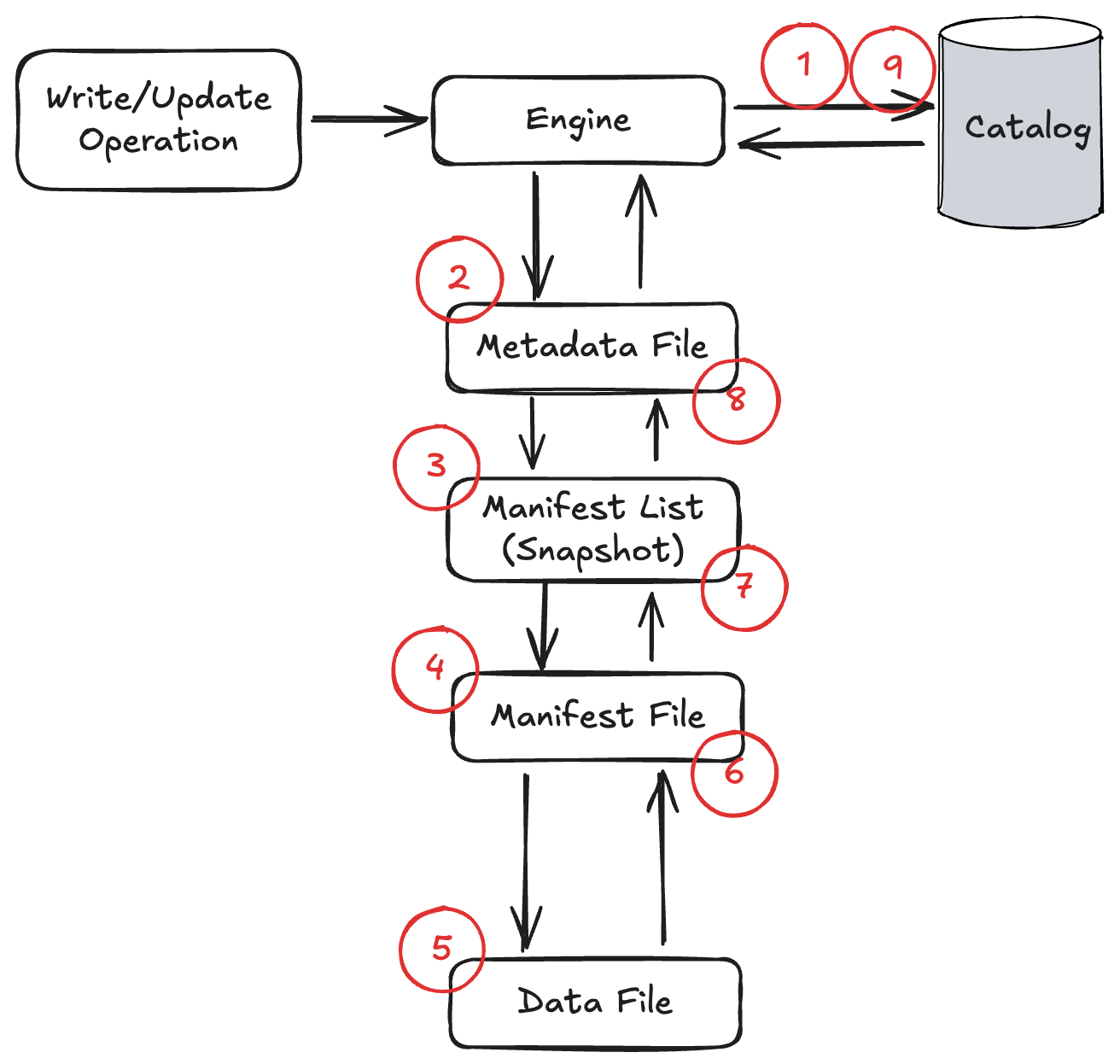
- A client polls the catalog and retrieves a pointer to the latest metadata file.
- The client opens the metadata file - this is super important, even for writing processes. The metadata file holds information such as the table schema and partitioning. From it, the client retrieves the location of the latest manifest list (snapshot).
- Assuming the table is not empty, the client then reads the manifest file locations from the snapshot.
- Based on the manifest files, the client reads the relevant data file metadata.
- Assuming the client must update a single row, it now has two different strategies:
- It performs a copy-on-write (COW) operation. The client copies the data file containing the affected row into a new file. All rows stay the same, only the affected one gets updated. This is the default option.
- It performs a merge-on-read (MOR) operation, which is usually better for optimizing write operations but slows down reads (unless compaction is performed on a regular basis). In this case, so-called delete files are created. There are two types of delete files - position deletes (marking a row at a specific position in a specific data file as deleted) and equality deletes (marking all rows matching a condition as deleted) - but what they basically do is tell a reader which rows should be skipped on read. For an update, the new version of the row is written into a new data file alongside the delete file. As a side note: with format version 3, Iceberg replaces position deletes with so-called deletion vectors - a more compact, binary representation of which rows in a data file are deleted. The idea stays exactly the same, it’s just a more efficient implementation.
- Once done, the client creates one or many new manifest files.
- Then the client creates a new manifest list (snapshot), including all manifest files which belong to this snapshot.
- The client creates a new metadata file.
- All of the steps so far happened without any locks. That is totally fine, because no file was mutated. Even if multiple writers are acting at the same time, they won’t affect each other (well … as long as the file names don’t conflict). In this final step, the client polls the catalog again: if the metadata pointer is still the same as in step 1, no other process wrote to the table in the meantime, and the metadata pointer gets updated. If the metadata pointer was updated in the meantime, the client needs to check whether there is a conflict and how to deal with it.
Step 9 of my tiny list was mind-blowing for me. Of course there are many other interesting topics in here (such as MOR vs. COW).
But as a TL;DR it could be phrased like this: the catalog is required for Apache Iceberg to provide ACID transactions.
Which catalog to use?
There are different types of Iceberg catalogs. I am not an expert on this, so I won’t compare many options in depth. Instead I only want to look at a few.
The first one is the Hadoop catalog. It’s not as heavyweight as it sounds: the Hadoop catalog is basically just a file living in the same file system as the metadata files - version-hint.text. The key benefit is that no additional (external) infrastructure is needed, which makes it a quick way to start using Iceberg tables. In fact, I could use it directly on my machine without further effort.
But it won’t be production ready in some cases. The Hadoop catalog relies on an atomic write of the version hint file - a guarantee that object stores traditionally did not offer. On S3, concurrent writers would simply overwrite each other: the last writer wins. (Interestingly, S3 introduced conditional writes in late 2024, which makes compare-and-swap on plain object storage possible - but the Hadoop catalog does not build on this, and the Iceberg project still strongly discourages it for production use.)
Besides the Hadoop catalog there are many other options for an Iceberg catalog, such as AWS Glue. These options typically handle concurrency much better than the Hadoop catalog.
Iceberg provides a catalog interface which allows for multiple implementations. They differ in nuances. Most important to understand: for production ready usage of Iceberg a centralized Iceberg catalog is probably needed.